














Beyond the Checklist: Making Walkthroughs Work For You

Shannon Streett,
Chief of Staff u0026 Development
October 6, 2026
Every box is checked. So what changed for teachers or students?rnrnIf you’re a principal or an instructional coach, you know this checklist. Walkthroughs land on the calendar because the district requires them. Every classroom gets a visit, the data gets turned in, and the box gets checked. But a checked box doesn’t tell you what to do next, and it doesn’t help a single teacher grow.

✓ Curriculum implementation walkthroughs = done.
✓ Every teacher’s been seen = done.
✓ Data turned in to the district = done.
Every box is checked. So what changed for teachers or students?
If you’re a principal or an instructional coach, you know this checklist. Walkthroughs land on the calendar because the district requires them. Every classroom gets a visit, the data gets turned in, and the box gets checked. But a checked box doesn’t tell you what to do next, and it doesn’t help a single teacher grow.
Think back to when you were in the classroom. When someone walked in with a clipboard, how did you feel?
Scroll through teacher social media and you’ll see how many teachers feel today: anxious, frustrated, and sometimes even angry about walkthroughs. That frustration is valid, and it’s giving us real-time information that is worth listening to.
Leader tension is real, too. Leaders have to be in classrooms, and without a clear plan, the urgent stuff wins every time. Scheduled walkthroughs fix that by putting classrooms on the calendar. But a walkthrough on the calendar isn’t the same as a walkthrough with a purpose. When walkthroughs happen just for compliance, they break trust.
I’ve been on both sides of the walkthrough clipboard. As a teacher, I knew the drill: the notice, the knot in my stomach, two or three observers in the back of my room, scribbling notes. Then they left, and I never heard another word. No feedback. No next step. Looking back, those walkthroughs checked every box. But nothing changed for me or my students, because no one ever came back to tell me what they saw, what to try next, or how it would shape the support we got.
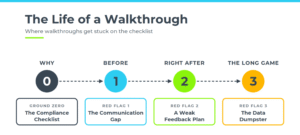
Going beyond the checklist means creating walkthroughs that actually work for you. And a walkthrough only works for leaders when it also works for teachers. Let’s go through the lifespan of a walkthrough: the ground zero issue that starts it all, three red flags we see over and over, and the green flag moves that fix each one.
Ground Zero: The Compliance Checklist
Before we get to the red flags, we have to start at the root. Most walkthrough problems grow out of one thing: walkthroughs that happen because the district said so.
They get thrown on the schedule. Every classroom gets visited. Or the coach goes around alone while the principal isn’t really involved. Either way, the walkthrough becomes the goal instead of a tool, and it’s missing a purpose.
Let’s be clear about one thing: we’re not talking about your walkthrough tool or form. The tool isn’t the problem. The compliance mindset is. The checklist we’re talking about is the compliance checklist: every teacher seen, box checked, done.
If leaders aren’t crystal clear on why they’re doing walkthroughs, teachers won’t be either. And that’s where trust begins to break down.
Green Flag Move: Know Your Purpose
Know your “why” before it ever hits the calendar. Start by answering the most important question:
Why are we doing these walkthroughs, and what are we going to do with what we see?
If you can’t clearly and confidently answer that question, don’t proceed with those walkthroughs yet. That’s the first step beyond the checklist.
Once you know your why, the next step is making sure your teachers know it too.
Red Flag #1: The Communication Gap
What It Looks Like: Teachers don’t know when you’re coming, what you’re looking for, or what happens with what you see. So they fill in the blanks themselves, and they usually fill them with worry. (Or they do what my teaching partners and I did: create a code for the group chat. THE EAGLE HAS LANDED, everyone.)
Green Flag Move: Communicate
Give a window, not a surprise. You don’t have to name the exact day and time. Something as simple as “Our team will be visiting classrooms next week” goes a long way.
We hear the pushback: “If I tell them, I’ll get a dog and pony show.” You can still give a window without naming the exact day. Walking into a room full of anxiety, with a teacher who feels completely unprepared, doesn’t do anybody any good.
Name the look-fors. Tell teachers what you’re coming to see. Maybe it’s curriculum implementation. Maybe it’s a recent lesson planning expectation, like posting objectives or success criteria. Maybe you’re looking for instructional trends to decide next steps for collaboration or coaching support.
Tell them how the data will be used. Say what it’s for: coaching cycles, teacher collaboration, and professional development decisions. Then say what it’s not for. Every teacher is quietly wondering, “Is this going in my file?” Answer that question before they have to ask it.
Need a starting point? Our Example Communication Email shows all three moves in action. Read it and look for the window, the look-fors, and how the data will be used. Then tailor it to your own walkthrough focus.
Communication sets the promise. The feedback conversation is where you keep it.
Red Flag #2: A Weak Feedback Plan
What It Looks Like: Walkthrough feedback shows up as a generic form email, a face-to-face conversation that comes weeks too late, or nothing at all. The connection between coaching and instructional improvement is built on trust and face-to-face relationships. A form email doesn’t build either.
The pushback we hear most: “I don’t have time to have a conversation with every single teacher.” Fair. But we’re not talking about a full coaching conversation.
Green Flag Move: Have a Feedback Plan
Keep it to 5–10 minutes, face to face. Answer two questions for the teacher:
- What moves did you make that were positively impacting student learning?
- What was getting in the way of learning the most, and what is one move that could improve it in the very next lesson?
That’s it. The teacher walks away with one thing they’re doing well and one next step to level up.
Immediate is best. Fast feedback lowers anxiety fastest. If more than one person is doing walkthroughs, try tag-team coverage: one person covers the class while the teacher steps into the hall for a quick conversation. Immediate feedback, no stress.
Pre-schedule the conversations. If immediate isn’t possible, schedule the feedback conversations when you schedule the walkthroughs. Then they don’t get lost when the week gets busy.
Match feedback to the focus you communicated. If you told teachers you’d be looking at curriculum implementation, give feedback on curriculum implementation. You can collect other data for trends, but don’t surprise teachers with it.
So the teacher gets their feedback. Now, what happens to everything you collected?
Red Flag #3: The Data Dumpster
What It Looks Like: The data gets collected, but there’s no clear plan for it. Maybe it was collected just to check the box. Maybe plans were made, life happened, and now it’s sitting in a binder nobody opens. Or the coach is so caught up in individual coaching cycles that there’s no bigger vision for the data.
Be honest: where does your walkthrough data live right now?
Green Flag Move: Use Data as a Compass
Let the data show you the need. Walkthrough data should drive three things:
- Individual coaching cycles
- Teacher collaboration and planning support
- Professional development choices
If we’re spending time, energy, and money, it needs to be based on a real need. The data you collected is your compass.
Have a plan for every walkthrough. Decide what happens with the data before you ever collect it. (Notice how that brings us right back to ground zero?)
Take a look at our Example School Trend Report. It shows what’s working and what’s getting in the way for each teacher, school-wide trends, and what it all means for coaching priorities. As you read it, ask yourself: how could this data address individual needs, and how could it shape collaborative planning support?
One important note: the school trend report is NOT shared with teachers. It includes individual classroom observation data and is meant for coaching conversations and planning. Teachers get their feedback through face-to-face conversation.
A checklist ends when the box is checked. A walkthrough that works ends with a plan.
Beyond the Checklist: Putting It All Together
Here’s the life of a walkthrough that actually works:
- Why: Know your purpose.
- Before: Communicate the window, the look-fors, and how the data will be used.
- Right after: Have a feedback plan: 5–10 minutes, face to face, matched to the focus.
- The long game: Use data as a compass.
The checklist tells you every teacher’s been seen. Going beyond it tells you what to do next. When walkthroughs work for your teachers, they work for you.
Free Resources to Get You Started
You don’t have to create a complicated plan or start with a blank page. We made these for you to tailor to your own walkthrough focus:
- Beyond the Checklist Planning Guide: answer the planning questions for each green flag move before your next round of walkthroughs.
- Example Communication Email: a model for letting teachers know what to expect.
- Example School Trend Report: a model for turning walkthrough data into coaching and collaboration next steps.
Where This Goes Next
Whether you’re a principal leading walkthroughs or a coach doing baseline walkthroughs, a walkthrough is only as strong as the coaching conversation that follows it. Coaching is an investment that requires a return, not just activity.
If this post gave you the walkthrough jumpstart, our coaching institutes are where you and your coaches build a framework for coaching that keeps momentum and impacts student learning:
- Instructional Coaching Institute (ICI): for coaches ready to build methodology.
- District Instructional Coach Training (DICI): for districts training coaches at scale, and principals who want their leadership team and coaches on the same page.
- Virtual Instructional Coaching Institute (VICI): for coaches who want the Institute experience remotely.
Learn more about our coaching institutes